Essential Laptop Accessories for College Students in India (Under ₹1,000)

A practical guide to upgrading your hostel desk and library productivity with affordable ergonomic stands, network dongles, and surge-protected cables.

College study desk setup with elevated laptop stand, mouse, and notebook

College students in India often spend between six and ten hours a day on their laptops—attending online lectures, compiling code, drafting semester papers, and working on group projects. Yet most students use their laptops flat on low hostel desks or bed mattresses, leading to severe chronic neck stiffness and thermal throttling from blocked exhaust vents.

Investing in a few thoughtfully designed, budget-friendly accessories can transform an uncomfortable study corner into an ergonomic, high-efficiency workstation without spending thousands of rupees.

1. Ergonomic Foldable Laptop Riser
Portronics Essential Ergonomics Pick

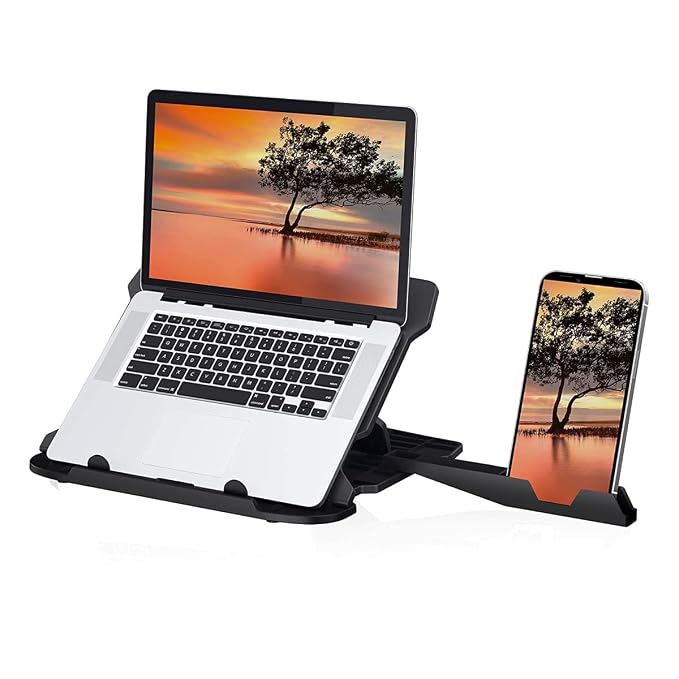
Portronics My Buddy Hexa Laptop Stand

₹329 INR (Ref. Price) • Ref: October 2026

A lightweight, multi-angle foldable laptop riser that prevents neck strain during long study sessions while allowing bottom vents to breathe freely.

Adjustability 7 height & angle levels
Material Reinforced ABS plastic with silicone pads
Compatibility Laptops from 10 inches to 15.6 inches
IDEAL FOR: Hostel and library study setups where portable ergonomic elevation is required without carrying heavy metal frames.
More Details (Specifications, Pros & Cons)

Editorial Verdict: A lightweight, multi-angle foldable laptop riser that prevents neck strain during long study sessions while allowing bottom vents to breathe freely.

Ideal For: Hostel and library study setups where portable ergonomic elevation is required without carrying heavy metal frames.

Complete Technical Specifications

Adjustability
7 height & angle levels
Material
Reinforced ABS plastic with silicone pads
Compatibility
Laptops from 10 inches to 15.6 inches
Folded Weight
Approximately 240 grams
Cooling Design
Hollow ventilated frame

Pros

  • Budget-friendly price suitable for any student pocket
  • Folds flat in seconds to slide inside standard backpacks
  • Silicone anti-slip pads prevent laptop slippage
  • Improves laptop airflow significantly during summer months

Cons

  • Plastic construction flexes slightly under 16-inch gaming rigs
  • Requires an external keyboard and mouse for comfortable typing
Check Price on Amazon
* Price & availability subject to Amazon.in. We earn qualifying affiliate commissions using tag smartech0da-21.

When a laptop sits flat on a desk, your neck is bent downward at a 30 to 45-degree angle. Over weeks of study, this posture exerts excessive pressure on your cervical spine.

A portable, multi-angle laptop stand elevates the display so the top third of your screen aligns with your natural eye level. Beyond posture benefits, elevation dramatically improves thermal airflow. Modern laptops draw cool air from bottom intake grilles and expel hot air through the rear hinge. By lifting the base 2 to 4 inches off your desk, you prevent thermal throttling during intensive tasks like 3D modeling or software compilation.

What to Look For:

  • Foldability: Look for flat-folding scissor or hexagonal mechanisms that slip into standard backpack compartments alongside your textbooks.
  • Ventilation Cutouts: Choose open-frame designs rather than solid trays so heat can escape freely.
  • Anti-Slip Silicone Pads: Ensure the bottom cradle has protective silicone padding to prevent your laptop’s front lip from scratching or sliding off during typing.

2. USB to Gigabit Ethernet Dongle (For Unstable Hostel Wi-Fi)
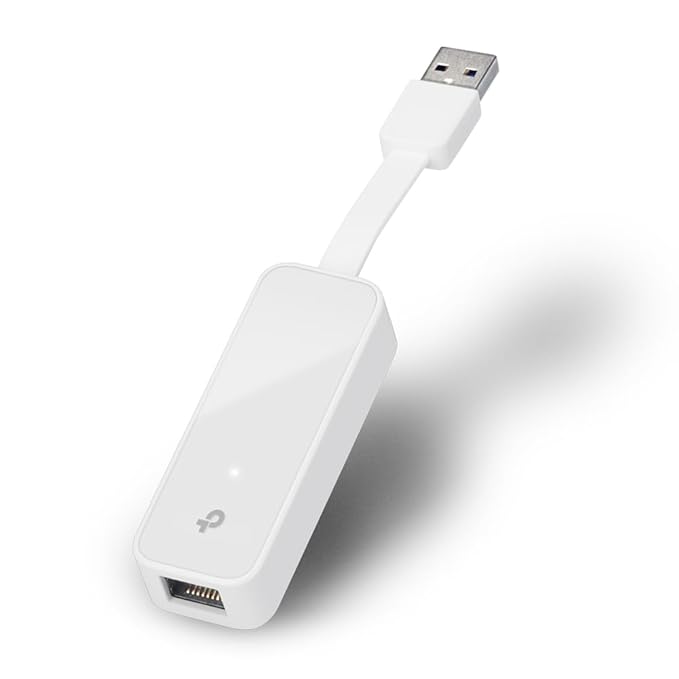
Modern ultrabooks have eliminated legacy RJ45 Ethernet ports to maintain paper-thin profiles. However, university hostel Wi-Fi networks in India face notorious challenges:

  • Signal attenuation through thick concrete and brick hostel walls.
  • High packet loss during peak evening hours when hundreds of students stream lectures simultaneously.
  • Random router disconnections during timed online aptitude tests or portal submissions.

A compact USB 3.0 or Type-C to Gigabit Ethernet adapter (such as the TP-Link UE300) allows you to plug directly into the hostel’s LAN wall jack. This grants you reliable, low-latency gigabit throughput without worrying about shared Wi-Fi band congestion.


3. Essential Peripheral: External Mouse and Spill-Resistant Keyboard
Ant Esports Best Entry Mechanical Under ₹2,000

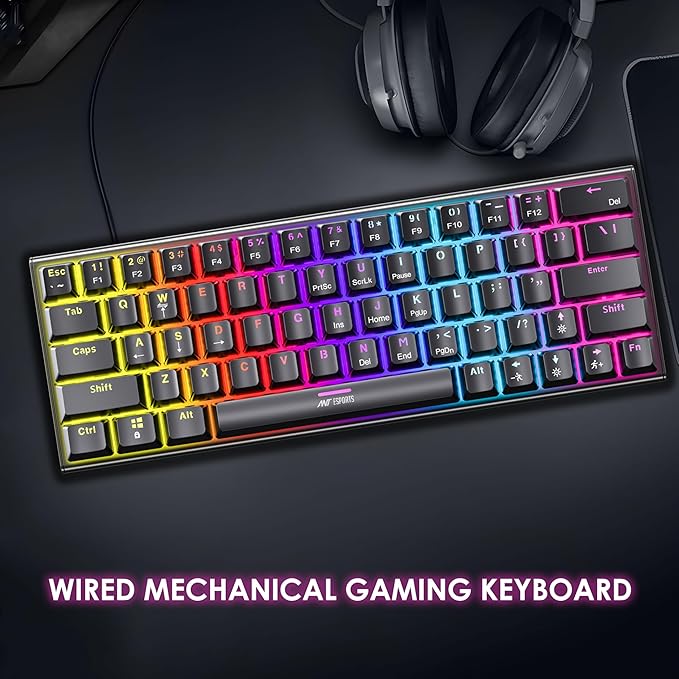
Ant Esports MK1200 Mini 60% Mechanical Keyboard

₹1,099 INR (Ref. Price) • Ref: October 2026

A space-saving 60% mechanical keyboard with tactile Outemu Blue switches, detachable Type-C braided cable, and multi-mode RGB backlighting.

Layout 60% Compact (61 keys)
Switch Type Outemu Blue Clicky Mechanical Switches
Keycaps Double-injection ABS keycaps
IDEAL FOR: Coders, writers, and casual gamers upgrading from a mushy membrane keyboard on a tight sub-₹2,000 budget.
More Details (Specifications, Pros & Cons)

Editorial Verdict: A space-saving 60% mechanical keyboard with tactile Outemu Blue switches, detachable Type-C braided cable, and multi-mode RGB backlighting.

Ideal For: Coders, writers, and casual gamers upgrading from a mushy membrane keyboard on a tight sub-₹2,000 budget.

Complete Technical Specifications

Layout
60% Compact (61 keys)
Switch Type
Outemu Blue Clicky Mechanical Switches
Keycaps
Double-injection ABS keycaps
Connectivity
Detachable USB Type-C to Type-A
Backlighting
Multi-zone RGB with 17 lighting modes
Anti-Ghosting
Full N-Key Rollover

Pros

  • Satisfying tactile click feedback at an unmatched entry price
  • Frees up immense mouse desk space for gaming or small desks
  • Detachable Type-C cable allows easy replacement if damaged
  • Solid base plate with minimal flex during typing

Cons

  • Outemu Blue switches are very loud for quiet office or shared bedroom use
  • Requires Fn-key combinations for arrow keys and function keys
  • ABS keycaps will develop shine over prolonged daily use
Check Price on Amazon
* Price & availability subject to Amazon.in. We earn qualifying affiliate commissions using tag smartech0da-21.

Once your laptop is elevated on an ergonomic riser, typing directly on its elevated keyboard strains your wrists. Pairing your setup with an external wireless or compact wired mouse and keyboard is essential.

  • Mouse: Look for basic optical mice with 1000 to 1600 DPI and quiet click switches if you frequently work late in shared hostel rooms.
  • Keyboard: A spill-resistant membrane or compact 60% keyboard keeps your posture neutral while protecting your expensive laptop keyboard from accidental hostel chai or coffee spills.

4. Voltage Surge-Protected Spike Strip

Indian hostel wiring is notorious for unpredictable power surges, voltage sags, and loose wall outlets. Connecting your laptop adapter, smartphone, and study lamp directly to ungrounded wall sockets risks damaging internal power delivery ICs.

Always invest in a reputed 4-socket or 6-socket surge suppressor with a built-in metal-oxide varistor (MOV) and thermal circuit breaker. Ensure the strip has BIS certification and an illuminated master switch for peace of mind.

Editorial Note: Smartech Finds editorial guides prioritize durable utility over aesthetic gimmicks. Product links lead to verified listings on Amazon India.

Frequently Asked Questions

Does a plastic foldable stand support heavy gaming laptops over 2.2 kg?

Lightweight plastic stands like the Portronics My Buddy Hexa are primarily designed for ultrabooks, MacBooks, and standard thin-and-light laptops up to 15.6 inches (under 2 kg). For hefty 16-inch gaming laptops with thick chassis, look for aluminum alloy risers or reinforced desk stands to prevent center sagging.

Why do I need a USB to Gigabit Ethernet adapter in 2026?

Most college campuses in India suffer from severe 2.4 GHz and 5 GHz Wi-Fi congestion in hostel dormitories, especially during peak evening hours or online timed exams. A plug-and-play USB Gigabit dongle lets you tap directly into the room's high-speed RJ45 wall jack for stable ping and zero packet loss.

Affiliate Disclosure & Editorial Policy

Editorial Transparency: As an Amazon Associate I earn from qualifying purchases.

Our product recommendations are thoroughly researched by the Smartech Finds editorial team. If you click on our Amazon links and buy a product, we may earn a small qualifying commission at zero additional cost to you. We never accept sponsored product placements or guarantee favorable reviews. Read our full disclosure policy →

Our Editorial Pledge to Indian Consumers

Smartech Finds does not accept free samples in exchange for positive coverage. We research products sold on Amazon.in with attention to Indian warranty terms, local service network availability, and practical value for money.